ultrazrq-design.work/comfyui-pipeline
◉ ComfyUI / AI PIPELINE
/// WORK · VOL.VI · IMAGE EDITING WORKFLOW · 3 DEMOS · LOCAL № 12 / 12
VOL.VI · COMFYUI · 2026

COMFYUI 工作流 & 实测 / 拆解

三个电商日常最典型的修图需求——模特持瓶、产品换景去标签、搭景合成—— 全部交给一条本地 ComfyUI 工作流:FLUX.2 Klein 9B KV + 4 步蒸馏采样, 在 8GB 笔记本显卡上实测跑通,JSON 直连 API 全自动出图。不碰 PS,不联网,不烧云。

↓ SCROLL FOR 3 DEMOS + WORKFLOW BREAKDOWN
DEMO C · STAGED SET 产品搭景成品:酒瓶置于搭设场景
№ 12 搭景合成 · 一瓶一景 OUTPUT OF 5 DEMOS · 768×1088
Demo A 持瓶成品 DEMO A · OUTFIT
Demo B 产品换景成品 DEMO B · SCENE
VOL.VI · NO.12 · CASE STUDY · 2026

修图不打开 PS:五个商业需求,一条工作流全接住

Five Commercial Retouching Jobs, One Local ComfyUI Workflow

任务
持瓶 · 换景 · 搭景 · 换装换姿势 · 风格迁移
模型
Klein 9B KV(Q5_K_M ≈ 6.5GB)
硬件
RTX 4060 Laptop · 8GB 显存
采样
4 步 euler 蒸馏 · CFG 1
自动化
API JSON 提交 · 无人值守
踩坑
OOM ×1 → 降画布与参考尺寸解决

电商设计里最贵的不是创意,是重复修图:今天给模特换条裤子, 明天把产品从白底挪进"高级感场景",后天把酒瓶摆进搭设好的商业布景里。 这些活以前全压在 Photoshop 里一格格抠。本文用一条本地 ComfyUI 工作流把它们全部接住—— 指令进去,成品出来,且每个环节都建立在实测数据上,包括那一次显存炸掉的真实翻车记录。

01

选型:为什么是 Klein 9B KV,而不是 Qwen-Image-Edit

候选模型有两个:社区口碑很响的 Qwen-Image-Edit 2509 Lightning(20B 级,多图编辑能力强), 和 FLUX.2 家族新出的 Klein 9B KV(9B 级,原生 KV Cache,带 4 步蒸馏)。 决定性因素很朴素:我的画布是一块 8GB 的笔记本显卡。

维度 FLUX.2 Klein 9B KV · Q5_K_M Qwen-Image-Edit 2509 Lightning
参数量级9B · GGUF ≈ 6.5GB20B · 量化后 11GB+
8GB 单卡可用性可跑(KV Cache + 自动 offload)勉强,需更激进量化
热跑速度 @ 竖版约 2 分钟 / 4 步明显更慢(20B 前后向)
多参考图输入ReferenceLatent 可链式挂多图支持多图
显存优化节点FluxKVCache 原生依赖外挂方案
指令遵循(英文编辑指令)稳,局部改动不乱动主体稳,中文语境更顺
选型结论

Qwen-Image-Edit 2509 不是不好——它在多图融合上依然是一流水准。 但在单卡 8GB、要求无人值守稳定出图的约束下,Klein 9B KV 的 Q5_K_M 量化 + 原生 KV Cache + 4 步蒸馏,是"跑得起来"和"跑得快"的交集。 选型不是选最强的模型,是选约束下最优的解。

02

工作流拆解:一条链讲清 ReferenceLatent 双向挂载

以 Demo A(双参考持瓶)为例,整条链只有五个部分。精简,是因为蒸馏模型把"多步 CFG 引导"压成了 4 步 euler + CFG 1——代价是调度器必须用 Klein 专属的 Flux2Scheduler,画布也必须用 EmptyFlux2LatentImage(尺寸为 16 的倍数)。

DEMO A · GRAPH TOPOLOGY
UnetLoaderGGUF · Klein-9B-KV-Q5_K_M → FluxKVCache → CFGGuider · cfg=1
CLIPLoader · qwen_3_8b_fp4mixed → CLIPTextEncode · 编辑指令 → ReferenceLatent
LoadImage · 参考图 → ImageScaleToTotalPixels → VAEEncode → ReferenceLatent · latent 位
ConditioningZeroOut → ReferenceLatent · 负向
RandomNoise + KSamplerSelect · euler + Flux2Scheduler · 4 步 + EmptyFlux2LatentImage → SamplerCustomAdvanced → VAEDecode → SaveImage
// 正负两条 conditioning 各挂一份同源参考 latent,保证"参考只提供身份,不污染构图"
  1. 装载三件套——GGUF 量化权重走 UnetLoaderGGUF,文本编码器用 fp4 混合精度的 qwen_3_8b,VAE 单独加载;FluxKVCache 把 KV 命中率换成本地显存。
  2. 参考图进潜空间——参考图统一过 ImageScaleToTotalPixels 控制像素预算, 再由 VAEEncode 压成 latent,而不是直接以像素贴图。
  3. 双向挂载——ReferenceLatent 同时挂到正向指令与 ConditioningZeroOut 的负向分支上, 正负条件对参考图的理解保持一致,避免负向把主体"洗掉"。
  4. 四步采样——CFGGuider cfg=1 时 ComfyUI 直接跳过负向计算,等效省一半前向; Flux2Scheduler 按画布尺寸生成 4 档 sigma。
  5. 解码归档——VAEDecode 出像素,SaveImage 带 filename_prefix 落盘, 供 API 直接取走。
03

Demo A · 模特持瓶:苗族盛装少女,手里那瓶新品酒

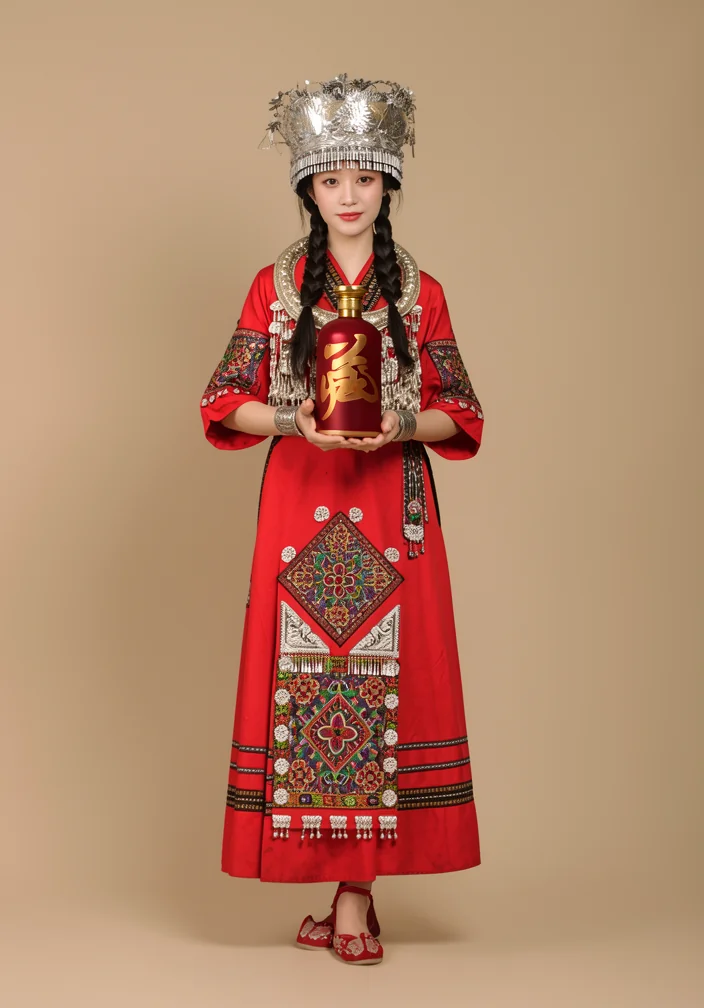
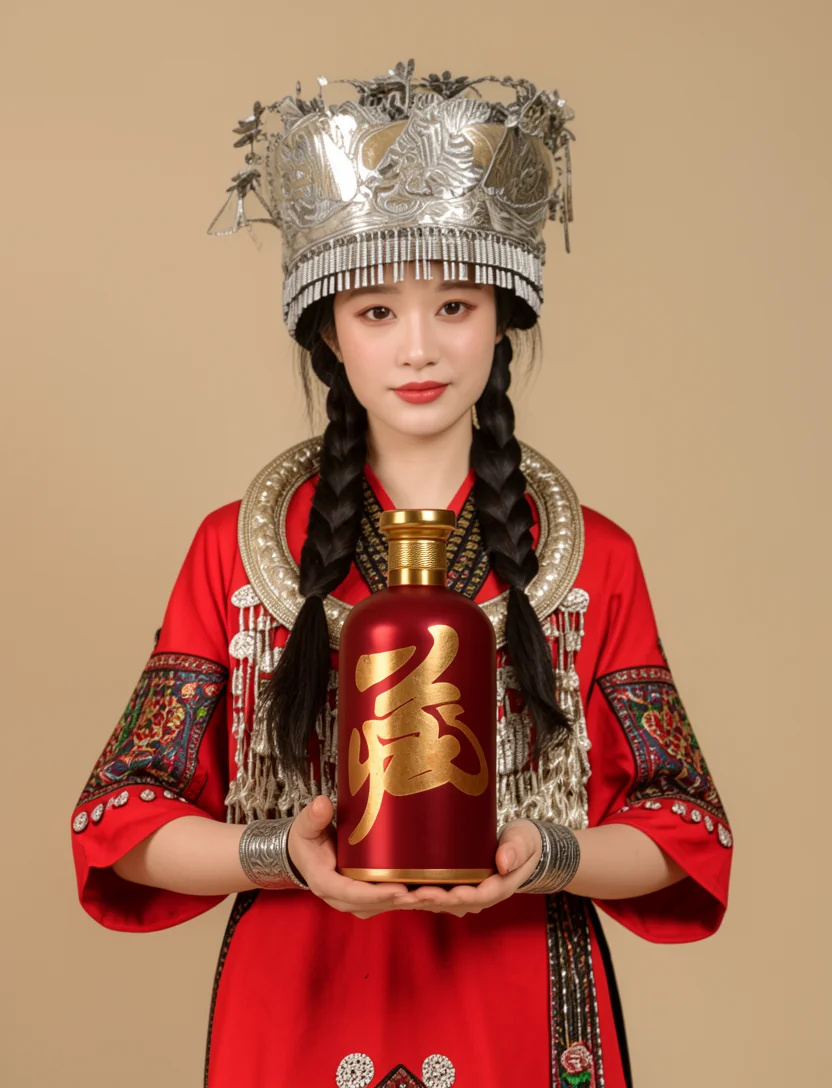
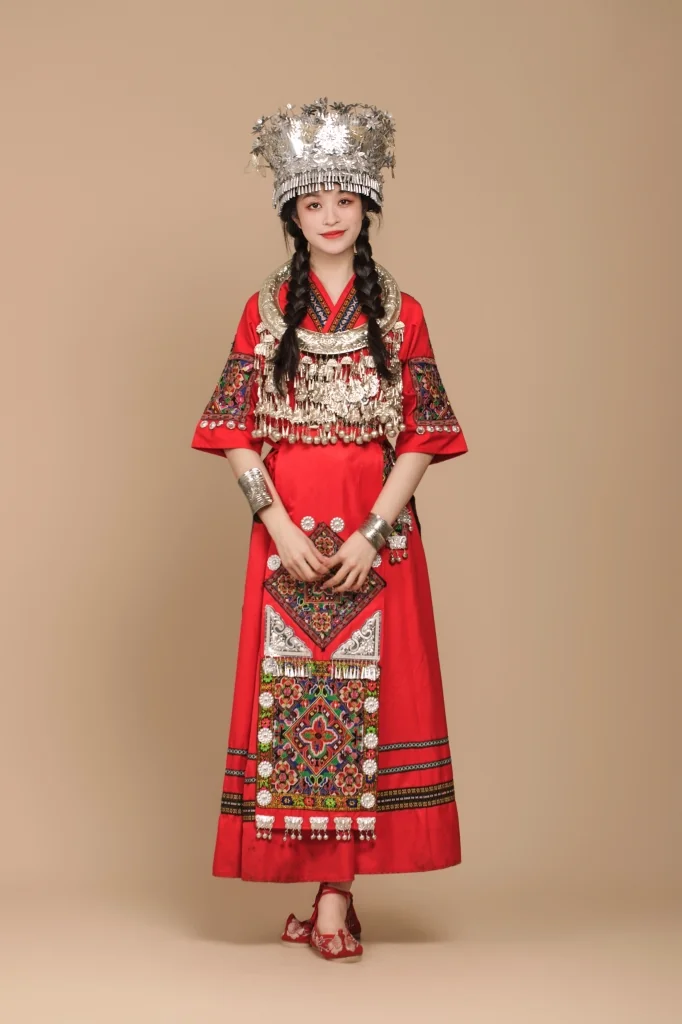
这次模特直接用一张网上找来的苗族盛装全身棚拍起手:银冠、银项圈、绣花红裙, 人脸、站姿、米色背景全部要保。产品植入拆成两步走—— 第一步人、瓶双参考进工作流,让盛装少女双手捧起那瓶新品酒送到镜头前;第二步把全身成品回灌工作流, 只下一条"重构景别"的指令出腰上半身图。电商最常要的"全身 + 半身"双景别,同一张脸、同一只瓶,天然一致。

BEFORE · 苗族盛装原片 Demo A 原图:苗族盛装少女全身棚拍
➔
AFTER · STEP 1 全身持瓶 Demo A 成品:盛装少女双手捧新品酒瓶全身照
STEP 2 · 全身图回灌 Demo A 第二步输入:全身成品回灌
➔
AFTER · 半身持瓶 Demo A 半身成品:腰上双手捧瓶景别
任务:苗族盛装 + 全套银饰 → 双手捧新品酒瓶 · 深红瓶身金字书法按素材复刻 锁定:面容 / 站姿 / 米色影棚背景
PROMPT · DEMO A / STEP 1 · 双参考持瓶(人 + 瓶) The woman in Figure 1, dressed in her full traditional Miao ethnic costume with the silver crown and all silver jewelry, now holds the liquor bottle from Figure 2 with both hands at chest height: the hands that were clasped together in front of her waist are now cupped around the bottle, fingers gently wrapped around it, presenting it gracefully toward the camera. Keep her costume, silver crown, jewelry, face, hairstyle and standing pose exactly unchanged; only her arms move slightly so her existing two hands hold the bottle. She has exactly two arms and two hands; no extra hands, arms or fingers anywhere. The bottle must be the exact bottle from Figure 2: a deep crimson-red glossy bottle whose front is covered by one large golden Chinese calligraphy character, with a golden cylindrical cap and a textured golden ring on the neck, and thin golden lines with small golden lettering near the bottom of the bottle. It has no paper label. Keep the bottle's shape, proportions, colors, cap and printed golden design exactly as shown in Figure 2. Do not turn it into a generic bottle and do not add any other text anywhere in the image. Keep the plain beige studio background unchanged. Commercial liquor campaign photography, professional studio lighting.
PROMPT · DEMO A / STEP 2 · 半身重构 Reframe this full-body photo to an upper-body portrait: crop to a waist-up composition showing her face, shoulders, both arms and the red liquor bottle she is holding with both hands toward the camera. Keep her exact face, hairstyle, traditional Miao ethnic costume, silver crown and jewelry, and the plain beige studio background unchanged. Keep the bottle exactly as it is: a deep crimson-red glossy bottle whose front is covered by one large golden Chinese calligraphy character, with a golden cylindrical cap, a textured golden neck ring and no paper label, held in her two hands. She has exactly two arms and two hands; no extra hands or arms. Photorealistic waist-up portrait, professional studio lighting, do not add any other text anywhere in the image.
704×1008 → 832×10884 STEPSEULERCFG 1 REF 0.4MP ×2(瓶参考裁剪)→ 1.0MPSEED 910012 / 910013
为什么稳

指令里"变什么"与"不变什么"分开写:动作只落在手臂上,盛装、银冠、背景、瓶身设计全部进入 Keep 列表。双参考时人、瓶各占一张图,Figure 1 / Figure 2 在指令里指名道姓, 模型就知道哪张管人、哪张管瓶。第二步不做"半身重抽",而是把第一步成品原样回灌,指令只管景别—— 编辑类模型对指令结构的敏感度远高于措辞华丽度,一条结构清晰的指令,胜过十次盲跑抽卡。

这个 Demo 还交过两笔学费:一是"新增一个双手捧瓶动作"的写法让模型多长出一条手臂,改成 "原本交叠的双手改为捧瓶"的迁移式指令就好了;二是有一版把 ReferenceLatent 从链式改成并联, 挂瓶参考的分支没接进采样器——悬空节点不报错、静默失效,模型压根没看到瓶子图, 全靠文字脑补出一瓶白标签通用货。改完工作流,务必顺着连线数一遍:正、负两条链上, 每个参考的 latent 都要能走到 CFGGuider。

04

Demo B · 产品换景去标签:加法与减法同时做

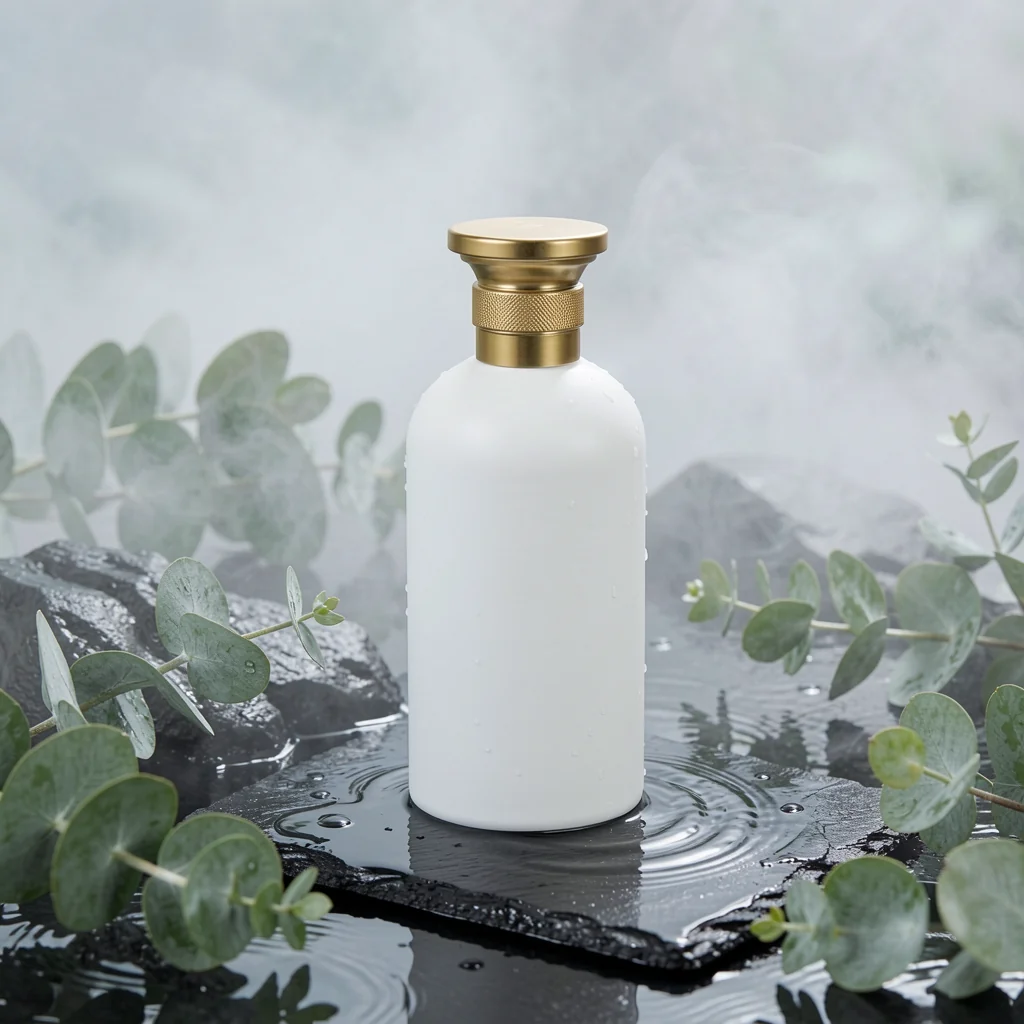
电商详情页的场景图经常要"一张产品、多套场景"。这张白瓶的原始素材带完整印刷标签, 指令要求同时完成两件方向相反的事:把瓶子放进湿地板岩 + 尤加利叶的高级场景(加法), 并抹掉瓶身全部文字与 Logo(减法)。

BEFORE Demo B 原图
➔
AFTER Demo B 成品
加法:湿地板岩 / 水波 / 尤加利 / 薄雾 减法:瓶身全部文字与标签 → 干净白瓶
PROMPT · DEMO B Place the white skincare bottle on a wet black slate stone surrounded by clear water ripples and fresh green eucalyptus leaves with soft mist. Remove all text, logos and printed labels from the bottle, leaving a clean blank white bottle. Keep the bottle's shape and proportions unchanged. Premium cosmetic product photography, soft studio lighting, shallow depth of field.
1024×10244 STEPSEULERCFG 1 REF 1.0MPSEED 20260905

减法指令的诀窍是给"删掉之后的样子"一个明确归宿——leaving a clean blank white bottle。 只说 remove 不说保留什么,模型会用自己的想象补全瓶身,多义词就进场了。

05

Demo C · 产品搭景:把酒瓶放进搭设好的商业场景

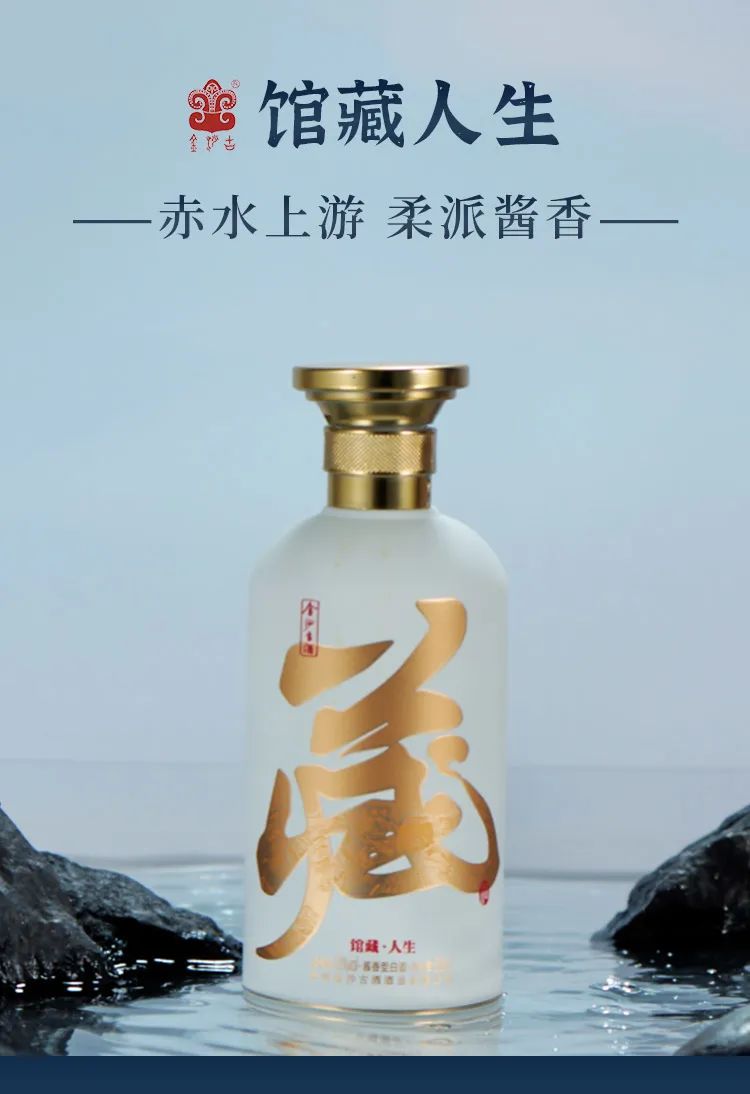
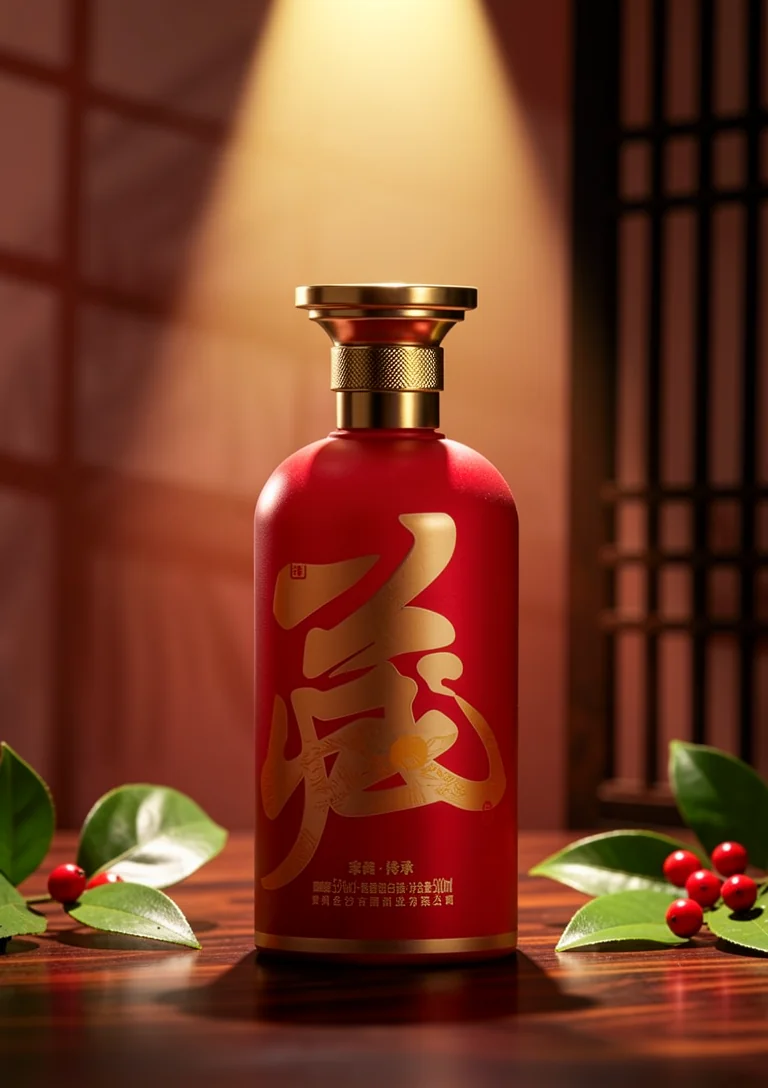
Campaign 图不一定真搭景。单参考就够:一张红瓶产品图挂上 ReferenceLatent, 场景全部交给指令去"搭"——胡桃木桌面、顶部金色聚光、虚化的中式木格栅屏风、绿叶红果道具, 瓶身形状、比例与印刷标签原样锁死。

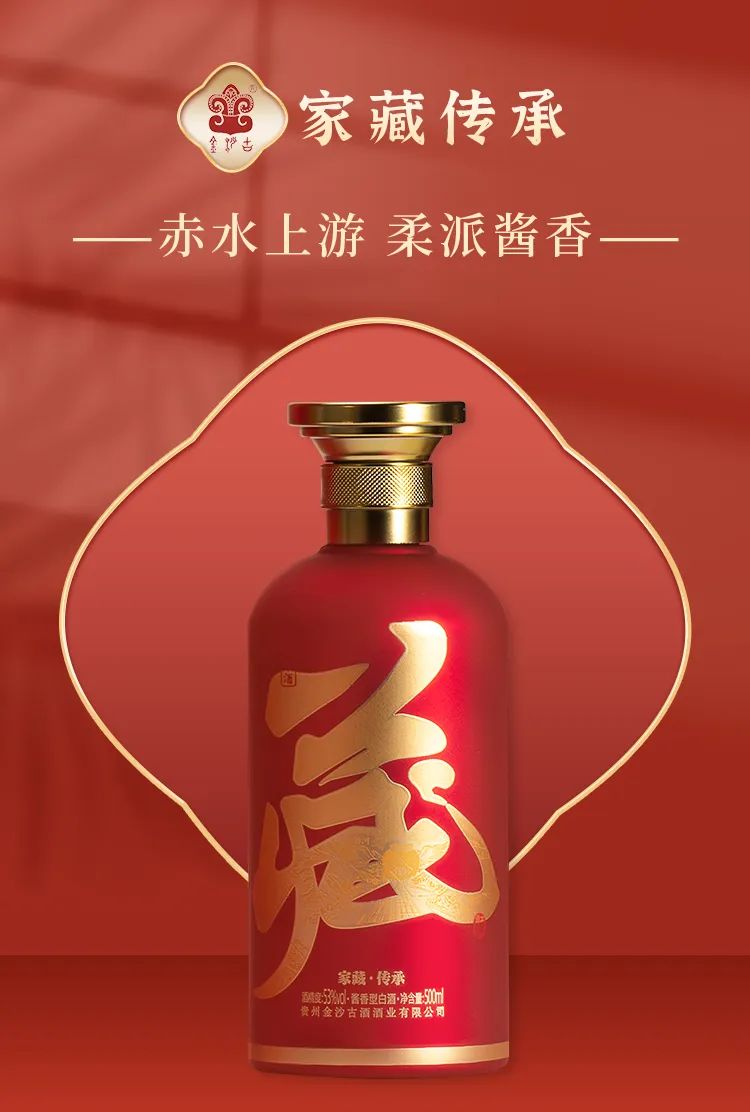
REF · PRODUCT Demo C 参考:红瓶产品图
➔
OUTPUT Demo C 搭景成品:酒瓶置于搭设场景
输入:一张产品图 → ReferenceLatent 单挂载 输出:搭景 Campaign 图 · 聚光 / 栅屏 / 道具一次到位
PROMPT · DEMO C Place this exact red skincare bottle into a professionally staged commercial product photography set: the bottle stands upright on a polished dark walnut wooden table, warm golden spotlight from above, a traditional Chinese wooden lattice screen softly blurred in the background, a few green leaves and scattered red berries as decorative props, soft realistic shadow under the bottle. Keep the bottle's shape, proportions, cap and printed label design exactly unchanged. Luxury e-commerce photography, shallow depth of field, absolutely no text.
768×10884 STEPSEULERCFG 1 REF 1.0MPSEED 910003
显存预算 · 8GB 的账

调参期试过"人 + 瓶"双参考的方案(各 1.0MP、画布 832×1216),采样第一步即报 torch.OutOfMemoryError——已分配 7.98GiB / 上限 8.00GiB,只差 128MB。 原因清楚:每多一张参考 latent,注意力序列就多一截,Q5_K_M 反量化的瞬时峰值空间就被挤掉。 最终 demo 全部按单参考 1.0MP、画布 ≤768×1088 出图,一次通过。8GB 卡上, 参考图不是"能塞多大"的问题,是"给峰值留多少余量"的问题。

06

Demo D · 换装 + 换姿势:同一张脸的第二种打开方式

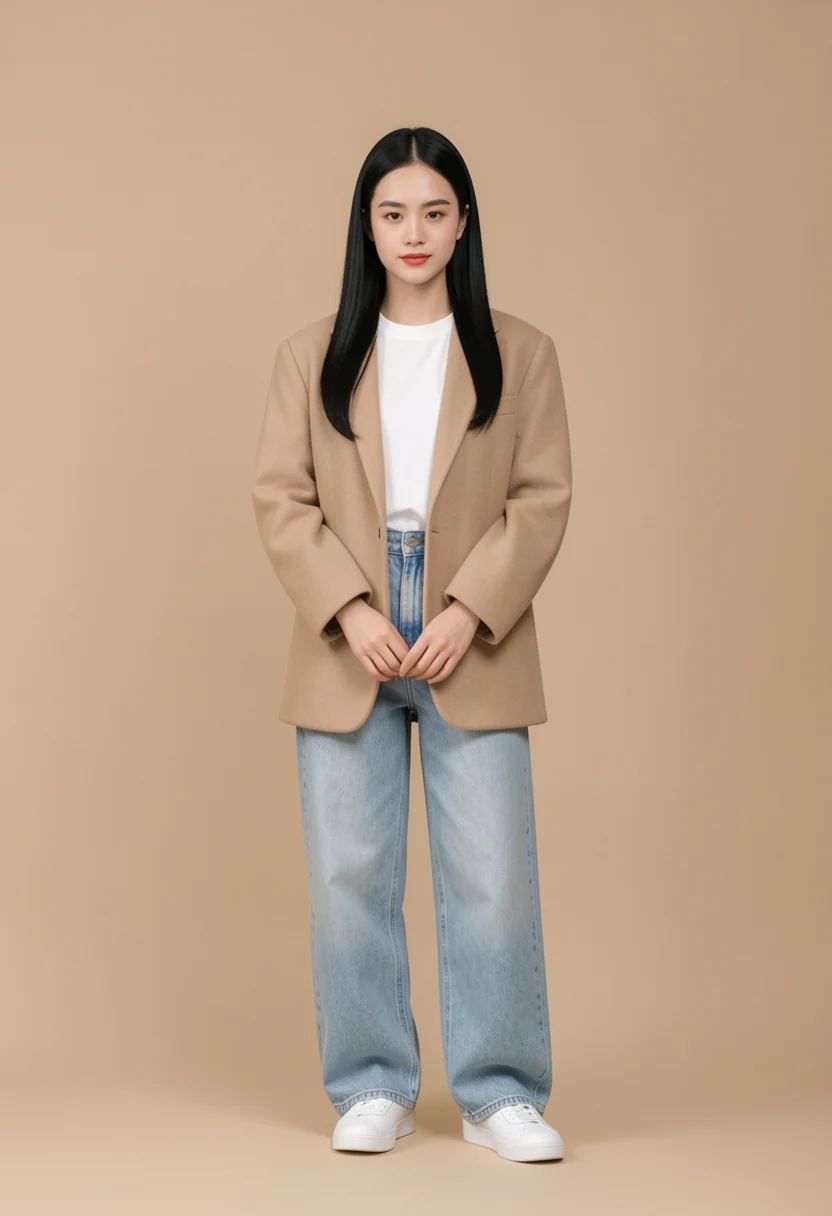
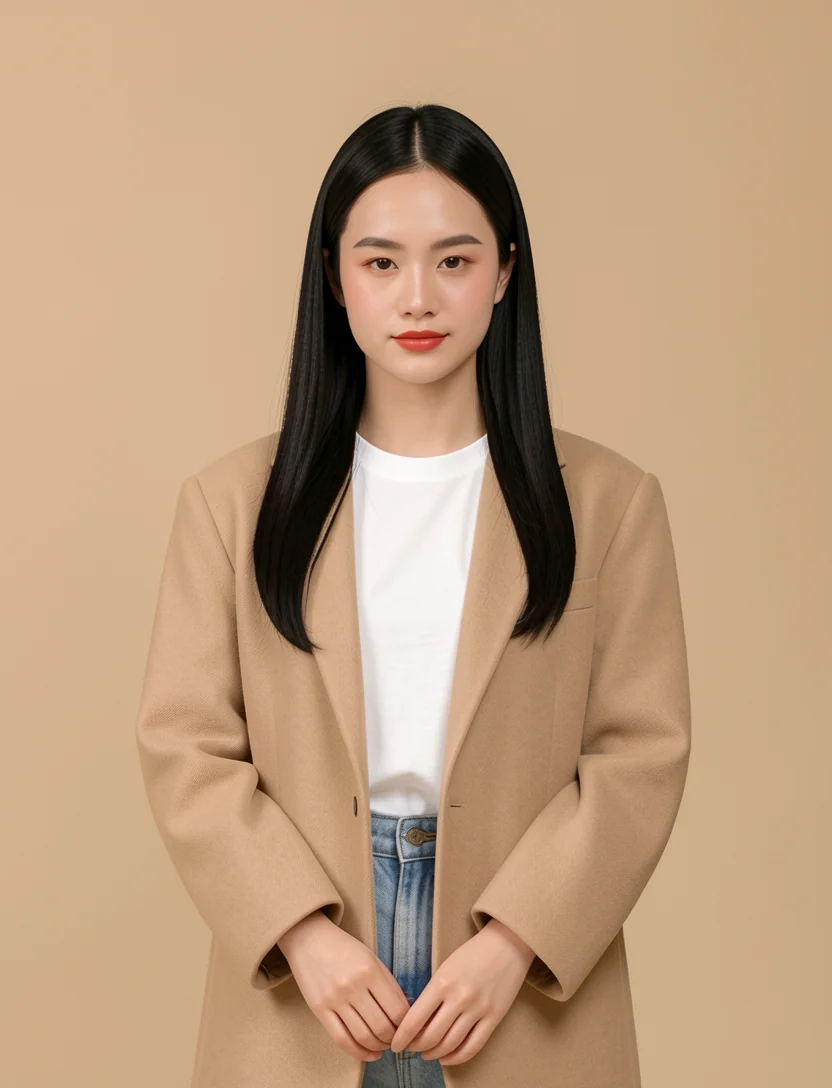
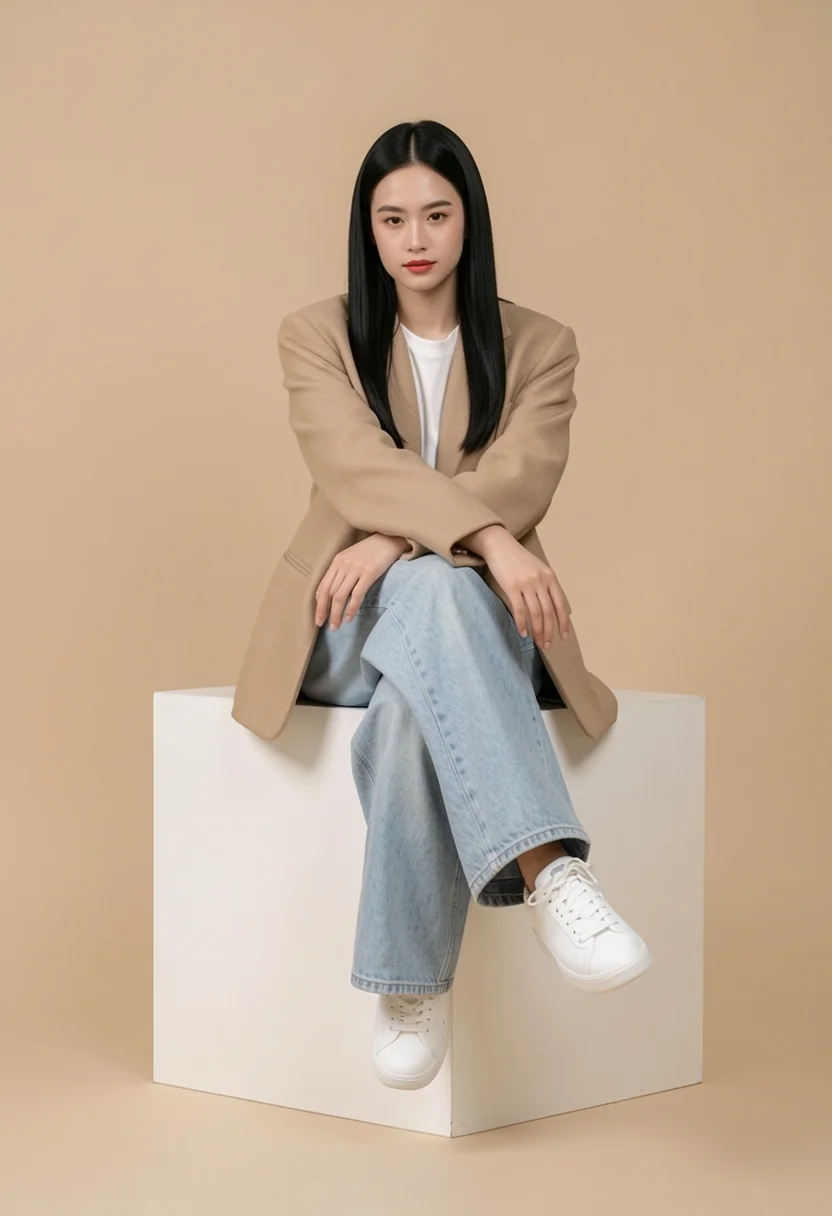
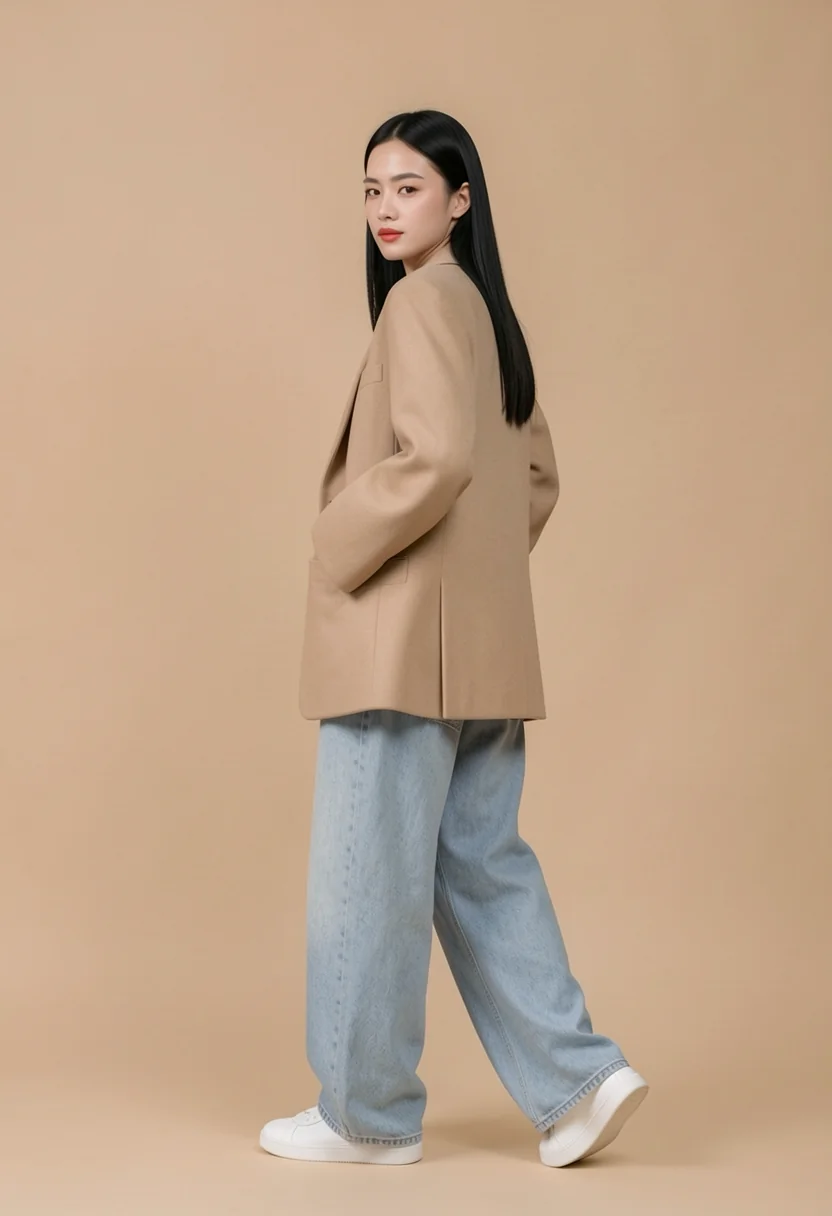
换装是电商模特图最高频的重复劳动。盛装少女单参考进工作流:银冠、银饰全摘,苗绣红裙换 米色廓形西装 + 白 T + 浅蓝阔腿牛仔裤,脸、站姿、米色影棚原样锁定;全身成品回灌, 再各下一句指令——半身景别、坐姿、侧身回眸。四张图同一张脸、同一套装扮、同一个影棚, "模特定装"一次成型。

BEFORE · 盛装原片 Demo D 原图:苗族盛装少女全身棚拍
➔
AFTER · 换装全身 Demo D 成品:换装后全身照
全身回灌 Demo D 第二步输入:换装全身回灌
➔
AFTER · 换装半身 Demo D 成品:换装半身照
姿势指令 · 坐姿 Demo D 第三步输入:全身回灌换姿势
➔
AFTER · 坐姿 Demo D 成品:同一模特坐姿
姿势指令 · 侧身 Demo D 第四步输入:全身回灌换姿势
➔
AFTER · 侧身回眸 Demo D 成品:同一模特侧身回眸
任务:盛装换常服 → 同一模特连出全身 / 半身 / 坐姿 / 侧身 锁定:面容 / 发型 / 米色影棚背景
PROMPT · DEMO D / STEP 1 · 换装 Change the woman's traditional Miao ethnic costume into modern city fashion: a beige oversized wool blazer over a white t-shirt, light blue high-waisted wide-leg jeans, and white sneakers. Remove the large silver crown headdress, all silver necklaces and silver jewelry; give her a clean modern long black hairstyle. Keep her exact face, facial features, skin tone, standing pose with hands gently clasped in front, body proportions, and the plain beige studio background with soft floor shadow unchanged. Photorealistic full-body head-to-toe fashion editorial photography, absolutely no text.
PROMPT · STEP 2 · 半身重构 Reframe this full-body photo to an upper-body portrait: crop to a waist-up composition showing her face, shoulders, arms and the beige blazer and white t-shirt. Keep her exact face, hairstyle, outfit, colors and the plain beige studio background unchanged. Photorealistic waist-up fashion portrait, professional studio lighting, absolutely no text.
PROMPT · STEP 3 · 坐姿 Change her pose: the same woman now sits on a white rectangular studio block with her elbows resting on her knees and her ankles crossed, torso leaning slightly forward, facing the camera. Keep her exact face, facial features, skin tone, long black hairstyle, beige oversized wool blazer, white t-shirt, light blue high-waisted wide-leg jeans, white sneakers, and the plain beige studio background with soft floor shadow unchanged. Photorealistic full-body fashion editorial photography, absolutely no text.
PROMPT · STEP 4 · 侧身 Change her pose: the same woman now stands in a three-quarter side view with both hands tucked into her blazer pockets, her weight shifted onto one leg, head turned to look back over her shoulder toward the camera. Keep her exact face, facial features, skin tone, long black hairstyle, beige oversized wool blazer, white t-shirt, light blue high-waisted wide-leg jeans, white sneakers, and the plain beige studio background with soft floor shadow unchanged. Photorealistic full-body fashion editorial photography, absolutely no text.
832×1216 · 832×10884 STEPSEULERCFG 1 REF 1.0MP 单参考SEED 910001 / 910002 / 910006 / 910007
换姿势的坑:参考图不是越多越好

姿势本来想走双参考——人一张、姿势参考一张,各挂一个 ReferenceLatent。 结果踩了两层坑:一是搜来的"坐姿参考"里混进了儿童照片,这种素材绝对不能进工作流, 素材审核是第一道工序;二是多挂一张参考,身份漂移与构图污染的概率都明显上升。 最终改回单参考 + 纯文本姿势指令:"变什么"只写动作,"不变什么"把脸、发型、 整套装扮逐件列进 Keep 列表——四张一次通过,比双参考方案反而更稳。

07

Demo E · 二次元风格迁移:同一瓶酒的第二种画风

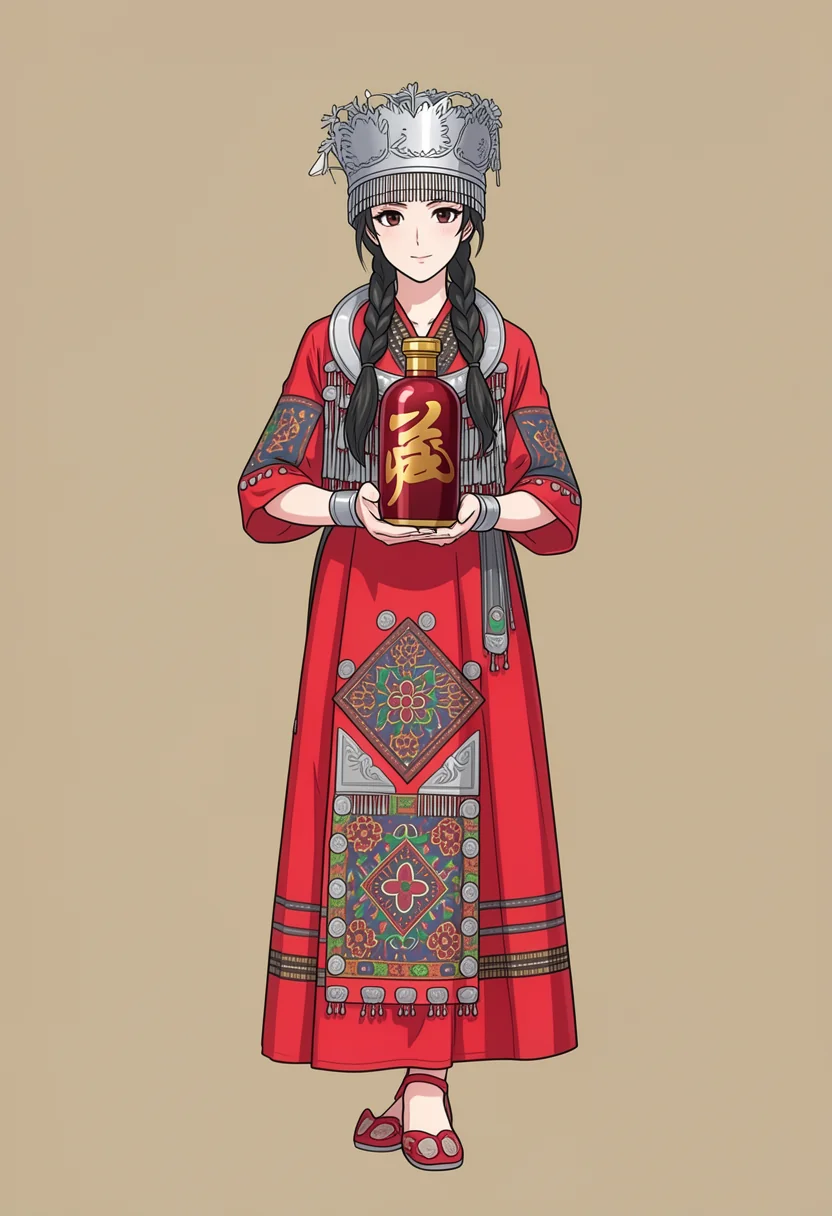
商业物料里还有一类高频需求:同一个 IP 要出二次元视觉版本——人还是那个人、瓶还是那瓶酒, 只是整体换成动漫笔触。拿 Demo A 修好的全身成品单参考回灌,一句风格指令整体二值化: 盛装少女转 现代日系二次元赛璐璐,构图、站姿、银冠银饰、双辫与米色影棚原样保留, 深红瓶身金字书法照搬不改——一条链产出同一 IP 的真人版与动漫版,双份物料。

BEFORE · 真人成品回灌 Demo E 输入:持瓶真人全身照回灌
➔
AFTER · 二次元画风 Demo E 成品:二次元画风持瓶少女
任务:真人持瓶照 → 二次元风格化,人物 / 酒瓶 / 构图全保留 锁定:瓶身设计 / 银冠银饰 / 米色影棚背景
PROMPT · DEMO E · 风格迁移 Convert this photo into a 2D anime illustration in modern Japanese anime art style: the same young woman in her full traditional Miao ethnic costume with the silver crown and all silver jewelry, holding the same deep crimson-red liquor bottle with both hands at chest height, fingers gently wrapped around it, presenting it gracefully toward the camera. Keep the exact same composition, standing pose, costume details, silver crown, jewelry, braided hairstyle and the plain beige studio background. Keep the bottle exactly as in the photo: a deep crimson-red glossy bottle whose front is covered by one large golden Chinese calligraphy character, with a golden cylindrical cap, a textured golden neck ring and no paper label. She has exactly two arms and two hands; no extra hands, arms or fingers anywhere. Clean cel-shaded anime rendering, crisp line art, vibrant colors, soft studio lighting, high quality anime key visual. Do not add any other text anywhere in the image.
832×12164 STEPSEULERCFG 1 REF 1.0MP 单参考 · 真人成品回灌SEED 910014
风格化的坑:先修产品,再做衍生

这版最想省事的做法是"直接拿第一版持瓶图二值化",但那时瓶身还是白标签通用货—— 风格迁移不改内容,只在内容之上换笔触:底图是错的,错误会被原样画进二次元里。 所以顺序必须是 Demo A 先把瓶、手全修对,再回灌做风格化。二次元化还有一个固有代价: 瓶身金色书法字按"形似"重绘而非逐笔复刻——KV 参考链管得到设计语言、管不到每一笔笔画, 若物料对字体有严格法务要求,仍需矢量字回贴。

08

自动化与边界:API 无人值守与能力边界

工作流的价值不在"手动跑通一次",在可复用、可批量。所有工作流保存为 ComfyUI API 格式 JSON, 由脚本直接 POST /prompt 入队,轮询 /history 拿结果、/view 取成品, 全程零人工。换需求时只改两处:指令文本与参考图文件名。

POST http://127.0.0.1:8188/prompt     { "prompt": <workflow.json> }
GET  /history/<prompt_id>             → status_str: success
GET  /view?filename=<...>&type=output → 成品 PNG 落盘

实测数据如下(同机同模型,冷热差异主要来自权重首次加载与整机降频):

5DEMOS · 全部通过
4采样步数 · 蒸馏
~2 min热跑单张 · 8GB
0PS 手修工序

能力边界也要说清楚:多主体复杂交互(超过两张参考)、文字小样重排、极精细的局部重绘边界控制,

仍是这类编辑工作流的高风险区——遇到这类需求,老老实实回 Photoshop。

复盘

这条工作流不是要取代修图师,是把"换裤子、换背景、拿产品"这类指令级重复劳动交还给机器, 把人的时间留给构图、配色和真正的创意判断。机器负责不掉链子,人负责出彩。

一条修图工作流最难的不是跑通,是把"抽卡"变成"交付"—— 锁定的元素不漂移、删除的元素不还魂、参考的身份不串味。 五个 demo、四步采样、一张 8GB 显卡,每次出图都在两分钟内稳定复现,这才是"工作流"三个字的含金量。

5Demo 全部通过
4 步蒸馏采样
~2 min热跑单张
6.5GBGGUF 权重 · Q5_K_M
0PS 手修工序
1 → 0OOM 复盘后清零

冷跑首张 383s(含权重加载与降频),热跑稳定在约 2 分钟——同样的活交给修图师, 一张持瓶 15 分钟起步。工作流跑的每一张,参数与种子全部留档,可复现、可批量。